IHRE BILDER. IHR ZUHAUSE.YOUR PICTURES. YOUR HOME.
Aus Lieblingsbildern
eine Bilderwand.Your favourite pictures.
A wall that feels like you.
Fotos einsetzen. Anordnungen vergleichen. Vorhandene Rahmen einplanen – und nur ergänzen, was noch fehlt.Add your photos. Compare arrangements. Use the frames you own — and find what is still missing.
Bilderwand gestaltenDesign your gallery wallKostenlos · Ohne Anmeldung · Fotos bleiben in Ihrem BrowserFree · No account · Photos stay in your browser
 Im Designer ausprobieren ↗Try it in the designer ↗
Ihre Bilder rein.Make it yours.
Mehrere Fotos auf einmal einfügen. Die App ordnet sie passenden Fotofenstern zu.Add several photos at once. The app matches them to suitable photo openings.
Den Unterschied sehen.See the difference.
Anordnungen vergleichen, Rahmen verschieben und Änderungen rückgängig machen.Compare arrangements, move frames and undo changes as you explore.
Mit einem Plan weiter.Leave with a plan.
Maße und Rahmenbedarf als PDF mitnehmen. Passende Produkte direkt beim Händler ansehen.Take dimensions and frame requirements with you as a PDF. View matching products at the retailer.
DER GALERIVA DESIGNERTHE GALERIVA DESIGNER
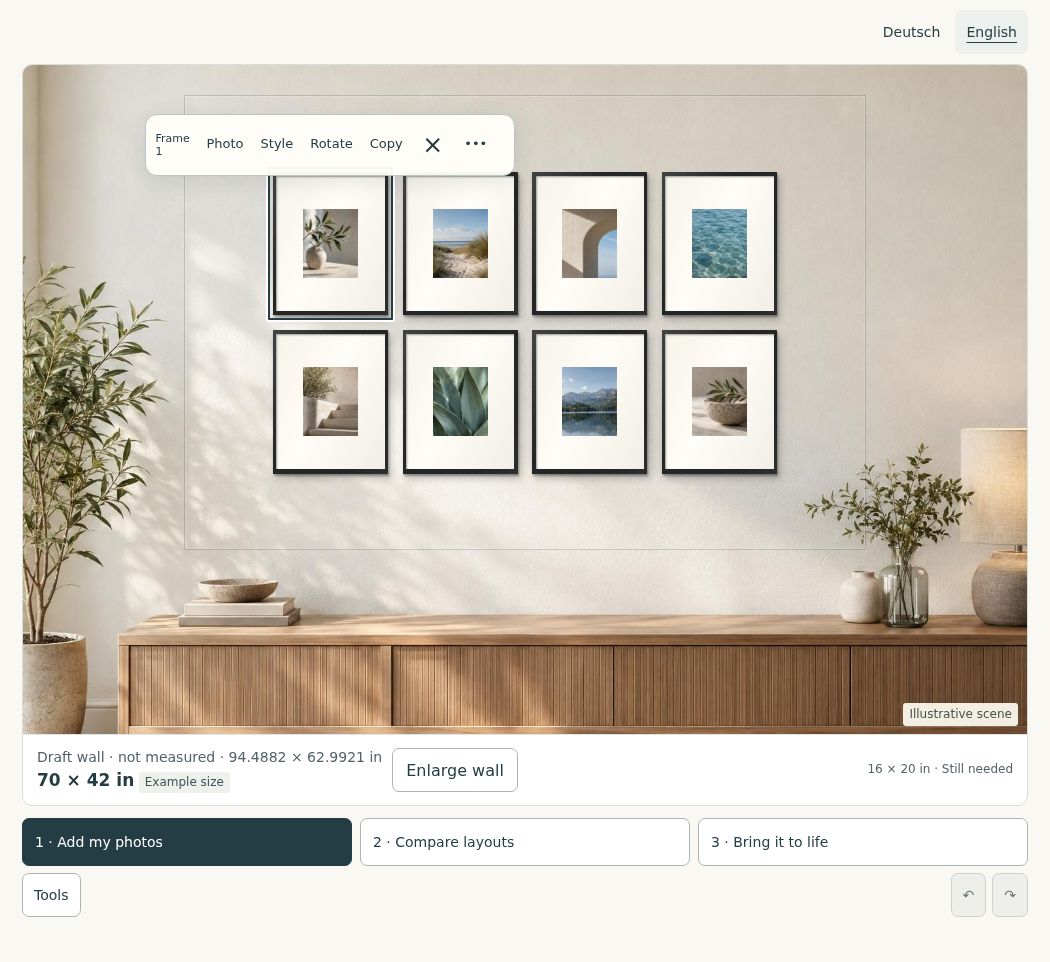
Ihre Wand. Ihr Entwurf.Your wall. Your design.
Starten Sie mit dem Beispiel und setzen Sie Ihre eigenen Fotos ein.Start with the example, then add your own photos.
Ihr Entwurf bleibt im geöffneten Fenster. Zum späteren Weiterarbeiten unter „Speichern“ die Projektdatei herunterladen. Die Beispielbilder und Raumansicht sind illustrativ.Your design stays in the open window. Download the project file under “Save” to continue later. Sample pictures and the room scene are illustrative.
ERST PLANEN. DANN ERGÄNZEN.PLAN FIRST. ADD WHAT YOU NEED.
Der beste Rahmen
kann schon Ihnen gehören.The right frame
might already be yours.
Messen Sie Ihre vorhandenen Rahmen und ergänzen Sie sie im Entwurf. Als „Vorhanden“ markierte Rahmen werden nicht zum Kauf vorgeschlagen.Measure your existing frames and add them to your design. Frames marked “Already owned” stay off the shopping list.
Für fehlende Rahmen gleicht Galeriva Außenmaß, Fotofenster, Farbe und Lieferland ab. Ein anderes Produkt verändert die Maße im Entwurf.For missing frames, Galeriva checks outside size, photo opening, colour and delivery country. A different product updates the dimensions in your design.
Aktuell: sechs LOMVIKEN-Varianten für Deutschland. Händlerlinks ohne Provision; Preis und Verfügbarkeit beim Händler.Currently: six LOMVIKEN variants for Germany. Retailer links without commission; prices and availability at the retailer.Gut zu wissen.Good to know.
Werden meine Fotos hochgeladen?Are my photos uploaded?
Nein. Fotos und Raumaufnahmen werden im offenen Browserfenster verarbeitet. Galeriva überträgt sie weder an einen Bilddienst noch an Händler. Heruntergeladene Projektdateien können Ihre Originalfotos und Vorschauen enthalten.No. Photos and room pictures are processed in the open browser window. Galeriva does not send them to image services or retailers. Downloaded project files can contain your original photos and previews.
Kann ich mein eigenes Zimmer verwenden?Can I use my own room?
Ja. Unter „Mehr“ können Sie ein frontales Raumfoto einsetzen. Mit zwei Referenzpunkten und gemessenen Wandmaßen richten Sie die Vorschau aus. Die App vermisst den Raum nicht automatisch.Yes. Under “More”, add a straight-on room photo. Align it using two reference points and measured wall dimensions. The app does not measure the room automatically.
Was enthält der Download?What is in the download?
Der PDF-Plan zeigt den Entwurf, Rahmenpositionen, Außenmaße sowie vorhandene und noch benötigte Rahmen. Er enthält keine Bohrpunkte. Die Projektdatei erhält neu eingefügte Originalfotos für das spätere Weiterarbeiten. Unter „Fotodruck“ können Sie die Ausschnitte samt Formaten und Mengen als lokales Druckpaket herunterladen. Die direkte Partnerbestellung ist noch nicht aktiv.The PDF plan contains your design, frame positions, outside dimensions and lists of owned and needed frames. It does not provide drill points. The project file retains newly added original photos for later editing. Under “Photo prints”, download your crops, sizes and quantities as a local print package. Direct partner ordering is not active yet.
Bestelle ich die Rahmen bei Galeriva?Do I buy the frames from Galeriva?
Sie kaufen beim jeweiligen Händler. Galeriva überträgt keinen Warenkorb und keine Fotos. Lieferbarkeit und endgültiger Preis werden dort geprüft. Partnerlinks werden unmittelbar als Werbung gekennzeichnet, sobald eine Partnerschaft aktiv ist.You buy from the retailer. Galeriva transfers neither a shopping cart nor photos. Delivery availability and the final price are checked there. Affiliate links will be labelled as advertising beside the link once a partnership is active.